
FUYL Smart Lockers are built to be universal — from five to 23 bays, they handle device loans, repairs, deployments, and charging in one secure system.
Dynamic Bays takes that flexibility even further. Instead of assigning one bay to a single workflow, bays can now support multiple types of device handoffs, all within your existing policies.
The result: you can effectively double the capacity of your FUYL lockers — without adding any new hardware.
Dynamic Bays is included at no additional cost for all FUYL Enhanced customers, so you can expand capacity without expanding your budget.
Dynamic Bays at a glance
Dynamic Bays is a new FUYL software capability that automatically allocates locker bays where they’re needed most, across loan, repair, charging, and deployment workflows.
Instead of tying a single bay to a single workflow, Dynamic Bays flexes your capacity based on:
- The workflows you’ve enabled
- What’s happening in real time at the smart locker
In practice, that means a bay used this morning to hand out a loaner can be reused later for a repair drop-off or another device handoff — keeping device exchanges safe, simple, and trackable.
How Dynamic Bays works
If you’re still wondering how we can double capacity without doubling your hardware — or the hassle — here’s how Dynamic Bays works, step by step.
You allocate by workflow, not by door
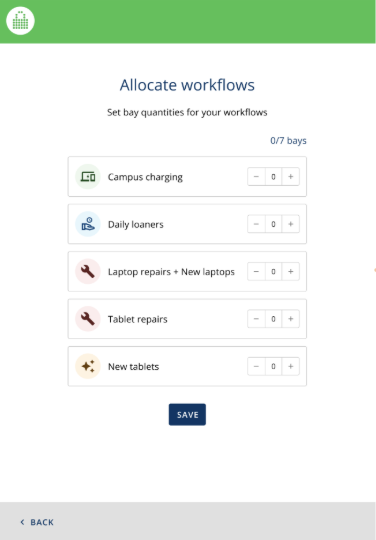
From the FUYL Kiosk admin menu (or during onboarding), you choose how many bays you want to dedicate to each workflow — for example, a mix of charging, loan, repair, and deployment.
Once you save, the system automatically assigns bays for you. You don’t have to remember which specific door belongs to which workflow.
Repairs and loans share the same pool
The heart of Dynamic Bays is shared capacity between linked workflows.
When you link a repair workflow to a loan or deployment workflow, they pull from the same pool of allocated bays. A bay that just handed out a loaner can be reused for a repair check-in or another loan instead of being permanently tied to one side of the swap.
Smart reserving keeps returns and drop-offs moving
Dynamic Bays also anticipates what’s coming next and reserves empty bays when needed, for example:
- A device is out on loan and needs a guaranteed spot for return
- Repair workflows are active and drop-offs are expected
The system holds enough space so users can still return loaners and drop off broken devices, even when the locker is close to full.
If you truly hit capacity (for example, too many devices on loan or sitting uncollected), admins see clear notifications and can free space by collecting or redistributing devices.
View every bay clearly in FUYL Portal
In FUYL Portal, the View Tower screen has been updated to reflect Dynamic Bays. Admins can see:
- Which workflows are assigned to each bay
- Which bays are in use vs. reserved
- Device IDs for items in repair workflows for tighter tracking
Charging workflows intentionally remain device-agnostic — no extra admin overhead where it isn’t needed.
Drop-offs and pickups still use separate bays — by design
One question that often comes up:
“If bays are more flexible now, can we just use a single bay for dropping off the broken device and collecting the loaner?”
We’ve intentionally kept these as two separate bay interactions, even with Dynamic Bays, because this design keeps handoffs clean and safe:
- Better traceability: Each action (loan started, repair received, device picked up) is a discrete transaction in its own bay, making audits and verification easier.
- Simpler for users: An empty bay opens for deposit and a different lit bay opens for pickup, so users handle one device at a time.
- Lower risk of damage: Not juggling two devices at once reduces drops — especially in crowded hallways and shared spaces.
What Dynamic Bays delivers
Here’s how Dynamic Bays maximizes smart locker capacity for both IT admins and device users:
- More capacity from the same hardware: Sharing bays across linked workflows means more devices can move through each smart locker per day — often effectively doubling usable capacity without adding another FUYL unit.
- Cleaner audits and fewer grey areas: Separate bays for drop-off and pickup give you stronger accountability and a clear record of where each device has been.
- Fewer blocked users: Reserving bays for expected returns and repair drop-offs reduces “tower is full” moments that derail workflows and push people back to IT desks.
- Simpler experience at the kiosk: Dynamic Bays works behind the scenes. Users still see straightforward, one-device-at-a-time steps that reduce juggling, drops, and confusion — particularly in busy education environments.
- Less manual configuration for IT: You tell the system how many bays each workflow should get. Dynamic Bays assigns and manages the doors automatically so you’re not constantly remapping bays.
Why it matters in different environments
Because Dynamic Bays is part of the broader FUYL ecosystem, it’s built to flex based on the needs of multiple types of organizations:
K–12 schools
Cope better with morning spikes in forgotten devices and sudden repair needs, without buying more lockers just to survive peak times. Keep students from juggling two devices at once and give IT teams a clearer picture of device movement.
Higher education
Support laptops, tablets, and specialty equipment across libraries, labs, and shared spaces with fewer capacity constraints — and a cleaner device trail for high-value assets.
Workplaces
Give employees consistent, self-serve handoff points for broken devices, swaps, and temporary loaners across sites, without increasing IT headcount or hardware footprint.
The common thread: more capacity, less friction, and better confidence in where your devices are.
Getting started with Dynamic Bays
If you’re already using FUYL Smart Lockers with Enhanced software, turning on Dynamic Bays is straightforward:
1. Decide your bay allocations
Look at demand patterns for each workflow — where you tend to run short on space or see bottlenecks — and decide how many bays you want to dedicate to charging, loan, repair, and deployment.
2. Set allocations on the kiosk
From the FUYL Kiosk admin menu, allocate bays to each workflow. The system will handle bay assignment, linked workflows, and reservations automatically.
3. Monitor and adjust over time
Use the View Tower screen in FUYL Portal to keep an eye on utilization and tweak allocations if your needs shift — for example, during busy seasonal peaks or new device rollouts.
If you’d like help at any step, your Customer Success representative can walk you through configuration to get the most from your FUYL deployment.
See Dynamic Bays in action
Dynamic Bays is all about getting more value from your FUYL Smart Lockers — without compromising safety, simplicity, or accountability.
If you’d like to see how it could change your loan, repair, and deployment workflows, reach out to your LocknCharge representative or schedule a FUYL demo. We’ll review your current setup and show how Dynamic Bays can help every bay pull double duty.
Author


.png)
