
In fully digital classrooms, mobile devices, such as Chromebooks and iPads, have become indispensable for effective instruction. However, as device fleets grow, so does the need for efficient repair management.
This article examines why mobile device repair is crucial, the common challenges, and the best strategies to protect learning flow and reduce device downtime in schools.
TL;DR
- Most student device repair issues in K–12 arise from fragmented intake, limited visibility, and manual tracking — not from the repair process itself.
- Downtime escalates rapidly during testing seasons, when even brief repair delays interrupt learning on a large scale.
- Schools that automate repair intake and loaner workflows free IT teams to focus on higher-value support functions.
- LocknCharge smart charging lockers cut device repair and loan management time by up to 80%, saving districts thousands of dollars over time.
Why K–12 device repair matters more than ever
Students rely heavily on their devices, and under constant classroom use, equipment failure is inevitable. On average, 8–12% of student-assigned devices and accessories are damaged or broken each year.
When a device fails, a teacher must stop instruction to troubleshoot, redirect focus, or find temporary alternatives. Students awaiting repairs or replacements lose access to essential digital tools, even though they remain present in class.
The challenge is substantial:
- Approximately 60% of schools handle between 1–10 broken devices weekly, according to LocknCharge’s recent survey of school districts. K–12 IT teams devote 2–2.5 hours daily on device management instead of addressing critical technology priorities.
- Up to 57% of U.S. educators coordinate device replacements each week, diverting time from instruction, and 63% confirm that students lose learning time as a result.
Tip: To see how these disruptions affect real operational and labor expenses in your district, try the LocknCharge device downtime calculator.
Common challenges schools face with K-12 mobile device repair
Device repair issues typically compound and create a persistent operational strain:
- High repair volume during critical periods. Testing windows and assessment weeks require full device functionality, leaving no margin when several units fail simultaneously.
- Limited IT staffing. Many districts depend on only a few IT coordinators to manage thousands of devices.
- Long turnaround times. Repairs are frequently delayed due to parts shortages, vendor shipping, or service backlogs.
- Lack of repair visibility. Many schools still rely on spreadsheets, paper forms, and informal approvals, making the process difficult to follow.
- Student accountability challenges. In districts with equity concerns, waived repair fees often diminish responsibility for proper device care.
Best practices for mobile device repair in schools
Effective K–12 mobile device repair relies on structured workflows that define how devices are reported, collected, repaired, tracked, and returned to students.
Establish a clear repair intake and triage process
The collection of broken devices needs standardization to be efficient. Standardization creates a single, centralized drop-off point where each damaged device enters the same workflow rather than being handled informally in classrooms or offices.
The challenge is that one-to-one technology in schools cannot be optimized through outdated methods such as scattered spreadsheets or paper logs.
A modern solution is to implement automated device lockers. Here’s how this process works in practice:
Here’s how this process works in practice:
- Submit the repair request. Students log in or scan their ID at the locker kiosk, choose “Repair,” and describe the issue.
- Secure device drop-off. The system opens an assigned locker bay, allowing the student to deposit the device safely without IT assistance.
- Centralized repair management. IT teams track all requests from a single dashboard, gaining real-time visibility into repair volume and prioritization. They also save time on collection by retrieving all broken devices from one locker instead of collecting them individually.
Maintain a spare device pool to reduce downtime
Spare devices absorb sudden spikes in demand during testing periods or major repair cycles. Although most schools maintain a limited reserve, many districts struggle to determine the right number of spares to keep on hand.
A practical starting point is to review the current inventory and address key operational questions:
- How many devices are currently deployed, and which grade levels depend on them the most?
- Which device models experience the highest rates of damage, loss, or theft?
- How frequently do devices fail due to normal wear over time?
- What proportion of repairs can be managed internally versus sent to external vendors?
- How long does a device typically remain out of circulation from intake to redeployment?
- How much instructional time is lost when a student lacks a device for one or more days?
- How much IT staff time is consumed managing and tracking device repairs?
- What is the average lead time to order and receive replacement devices during peak demand?
- Which devices are so essential that even short-term downtime is unacceptable?
- Does the current budget allow for maintaining an adequate spare pool?
Tip: As a general rule, districts should maintain spare inventory equal to at least 10–15% of the total device fleet.
Centralize repair data
Centralizing repair data starts with consistent asset IDs and a detailed repair history for every device, allowing IT teams to track what failed, when it failed, and how often it required service.
Recognizing when failures increase enables districts to schedule timely refresh cycles. For example, student-assigned laptops have a lifespan of less than five years, and as they near that point, the likelihood of failure and costly repairs increases sharply.
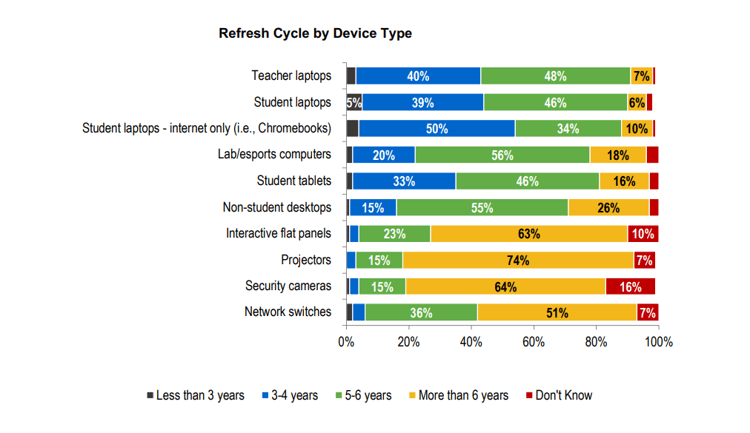 Source: CoSN 2025 State EdTech Leadership Survey
How can schools collect repair data reliably? The answer lies in integrating asset tracking systems and IT ticketing tools with smart lockers. The integrated system records repair information automatically and generates insightful reports.
This method significantly reduces manual work and provides IT teams with a reliable way to share repair status and device availability with educators and students.
In-house vs outsourced mobile device repair for schools
Most school districts use a combination of in-house and outsourced repair models. Minor issues are typically managed internally to restore devices quickly, while complex repairs are sent to external vendors.
This approach is now standard in K–12 IT operations. According to the CoSN 2025 State EdTech Leadership Survey, 66% of districts employ outsourcing strategies for IT functions, making vendor repair support the rule rather than the exception.
The balance between internal and external repair depends on staffing levels, device volume, and the amount of downtime a district can tolerate.
|
Repair model |
Strengths |
Trade-offs |
|
In-house repair |
|
|
|
Outsourced repair |
|
|
Additional reading: To better understand how device repairs, loaners, refresh cycles, and budgeting connect, explore our guide to device lifecycle management in education.
How to evaluate a K–12 mobile device repair provider
Districts should evaluate potential repair partners using measurable criteria:
- Defined repair turnaround times supported by SLAs
- Certified technicians trained on Chromebooks and iPads
- Use of original equipment manufacturer (OEM) or OEM-equivalent replacement parts
- Transparent repair status through cloud dashboards and automated reports
- Support for large-scale device programs
- Scalable repair capacity during testing seasons or high-demand periods
- Flexible coverage, such as insurance, protection plans, or flat-rate repairs
- Ability to align repair data with district inventory or asset management systems
Once these factors are established, districts can more accurately determine which vendors best match their operational and financial priorities.
The following providers are widely used in K–12 education and demonstrate how these repair capabilities function in practice:
- Lexicon. Recognized for insurance-backed repair programs and fixed flat-rate pricing. It appeals to districts seeking predictable costs and detailed fleet analytics.
- Gophermods. Distinguished by its full-service repair model that includes certified refurbishment, trade-ins, and responsible recycling. It suits districts emphasizing sustainability and long-term device lifecycle management.
- iTurity. Known for managing high-volume repairs efficiently. It provides device protection plans and pay-as-you-go pricing for districts without in-house repair teams.
Additional reading: Explore the 10 best mobile device management solutions for remote handling of device repairs.
Adapting device loaner programs for K-12 environments
A loaner device is a temporary replacement provided when a student’s assigned device is unavailable, allowing continued access to digital learning tools.
Device loaner programs for universities are more common and well-established in comparison to K-12, where districts often distribute spare devices directly to students. Although this approach simplifies logistics, it increases replacement costs because each spare device remains in circulation until it eventually needs replacement.
Adapting a structured loaner model to K–12 environments can deliver meaningful operational benefits. When loaners are issued only for short, defined periods, districts reduce overuse and extend the usable life of those devices. At the same time, students maintain uninterrupted access to digital tools, allowing instruction to continue while primary devices are repaired.
Establishing a device loan policy
At a minimum, a K–12 loan policy should include:
- Eligible device types that can be loaned and those excluded
- Approved loan scenarios, such as repairs in progress, accidental damage, loss, or theft
- Eligibility rules for first-time and repeat borrowers
- Pickup and return procedures, including location, identity verification, and check-ins
- Loan duration and extension criteria
- Device care and usage guidelines throughout the loan period
- Liability and penalties for lost, stolen, or damaged loaner devices
- Required documentation acknowledging loan terms and responsibilities
Optimizing device loans
Just like repairs, device loans can be optimized using smart lockers. One of the immediate smart locker benefits is that students can check out and return loan devices without disrupting teachers or IT teams.
Here’s how the process works:
- Self-service access. An authorized user approaches the locker kiosk, selects the loan option, and verifies their identity using a school ID or district account.
- Automated device release. The system assigns an available device and opens a designated bay, allowing the user to collect it without staff assistance.
- Defined loan controls. The platform enforces preset duration rules, such as same-day or multi-day returns.
- Real-time monitoring. Administrators track which devices are active, overdue, or unavailable through a centralized dashboard, with alerts triggered for required action.
- Guided returns. The kiosk directs the user to the correct bay and confirms that the device is securely connected for charging.
How LocknCharge solves school device repair & device loans
LocknCharge offers self-serve smart charging lockers to make device repairs structured, transparent, and easy for students, teachers, and IT teams.
Here is how our smart charging lockers minimize device downtime:
- Self-service checkouts and drop-offs. Students can check out, return, or report a device directly through an integrated touchscreen — no staff assistance required.
- Centralized cloud control. IT administrators oversee users, bays, notifications, and all repair & loan workflows through a secure online portal.
- Prebuilt, school-ready workflows. Repairs, loans, charging routines, and deployments can be tailored to varying policies and grade levels.
- Flexible locker sizes. Models with 5–23 bays accommodate different space constraints and support varying daily repair or loan volumes.
- Age-appropriate access. Authentication through QR codes or ID badges is secure and simple for middle and high school students.
- Seamless integrations. Fully compatible with student information systems (SIS), IT support ticketing, and asset management platforms, including Incident IQ, ServiceNow, and Learn21.
- End-to-end support. Guided onboarding, responsive customer service, and a dedicated success manager help districts operationalize new workflows effectively.
- Built for schools. Durable, ventilated, tamper-resistant steel design fits classrooms, libraries, and administrative offices alike.
With over 25 years of experience in educational technology, LocknCharge supports more than 15,000 schools worldwide. Customers report reducing device management time by 80%, saving an average of 360 IT hours and reclaiming 200 instructional hours annually.
Request a personalized demo to discover how LocknCharge can strengthen your district’s device management strategy.
Bottom line
- The efficiency of device repairs directly influences learning continuity, as students without functioning devices lose access to essential learning apps.
- Schools that standardize repair intake, tracking, and turnarounds experience less downtime than those relying on informal, classroom-based processes.
- A hybrid repair model that integrates in-house work with outsourced services offers the best balance of speed, scalability, and cost efficiency.
- Device repairs are most effective when incorporated into a device lifecycle strategy that includes spare pools, fleet management, and timely refresh cycles.
- For some schools, smart lockers may require a notable upfront investment; however, the resulting operational improvements greatly outweigh the overall smart locker cost.
FAQs
How do schools manage mobile device repairs?
Most schools follow a standardized process that combines repair forms, asset tracking, and either in-house or vendor-based repairs.
How long should device repairs take in K–12 schools?
Best-practice benchmarks target same-day or next-day completion for minor fixes and one to two weeks for vendor or warranty-related repairs.
Should schools repair or replace student devices?
Schools typically repair devices when costs are reasonable and replace them once repair expenses exceed the device’s remaining value.
Is in-house or outsourced repair better for schools?
A hybrid model is most effective — internal teams manage routine fixes, while external vendors handle complex or warranty work.
How can schools reduce device downtime?
Downtime decreases when schools standardize repair intake, maintain a dedicated spare device pool, track repairs through a centralized system, and establish firm turnaround goals.
Author


.png)
