
Many organizations already practice hardware asset management, but its real value emerges when a structured methodology governs every phase of the device lifecycle — from initial planning to secure decommissioning.
This article describes the key hardware asset management stages in education and enterprise and outlines the best practices for managing each phase with minimal IT effort and maximum operational efficiency.
TL;DR
- Each device must have a clearly assigned owner or location from the moment it is issued until it is officially returned.
- In mobile programs, secure storage directly impacts daily availability and the accuracy of inventory records.
- LocknCharge smart lockers can save up to 360 IT hours per year and cut device management effort by as much as 80% through automation of deployments, charging, loaners, and repairs.
- Smart lockers also help schools reclaim up to 200 instructional hours annually, while top-loading charging carts save 70 hours per year on device distribution and collection.
What is the hardware asset management lifecycle?
Hardware asset management (HAM) is the process of tracking, controlling, and maintaining physical devices throughout their operational life. In essence, hardware asset lifecycle management answers four fundamental questions:
- What devices do you own?
- Where are they?
- Who is using them?
- What condition are they in?
Although many organizations, including schools and enterprises, maintain formal HAM practices, they continue to encounter recurring challenges:
- Devices disappear or sit idle because ownership and location are unclear
- Downtime increases when broken devices cannot be repaired or replaced promptly
- Security risks escalate when outdated or untracked hardware remains in circulation
- IT departments devote excessive time to repetitive device issues instead of focusing on strategic work
A glaring example is Chicago Public Schools (CPS). A recent inspector general report revealed that CPS classified up to 77,000 devices as lost or stolen in a single year, amounting to more than $23 million in asset value. The district also spent $3 million on a tracking system that was seldom used to recover missing devices.
In the business context, a joint Intel and Ponemon Institute study found that 329 organizations collectively lost over 86,000 laptops. Using an average cost of $49,246 per lost laptop, the study estimated the total financial impact at approximately $2.1 billion.
The six core stages of hardware asset lifecycle management for education and enterprise
The solution lies in adopting a structured approach divided into clear lifecycle stages. Although various sources may use different terminology, most hardware asset management frameworks follow the same essential steps:
planning > procurement > deployment > usage & support > maintenance > retirement
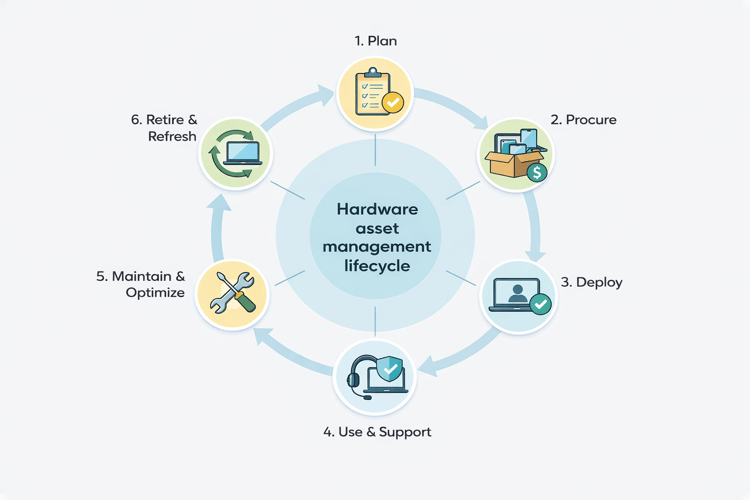
The following six-stage hardware asset management lifecycle aligns with NIST Special Publication 1800-5 on IT Asset Management.
|
#1. Plan |
Define device standards, usage models, and replacement timelines based on operational needs |
|
#2. Procure |
Purchase approved devices and accessories with accurate quantities and budget controls |
|
#3. Deploy |
Assign devices to users or locations with proper setup and accountability |
|
#4. Use & support |
Manage daily usage and device issues |
|
#5. Maintain & optimize |
Repair, audit, and redeploy devices |
|
#6. Retire & refresh |
Securely remove aging devices and replace them according to lifecycle plans |
#1. Plan: Designing the right mobile device fleet
The primary goal of the planning stage is to understand how students, teachers, staff, or frontline workers use their devices, then standardize models to reduce support complexity and minimize device issues.
Planning also involves treating charging carts, charging stations, and smart lockers as essential hardware asset management tools rather than optional accessories.
Before progressing to procurement, organizations should evaluate the following:
- Which devices meet both current and upcoming OS, application, and framework requirements?
- Which machines cannot be upgraded, and what specific technical limitations exist?
- How will patching, update policies, and off-network devices be managed?
- Will asset data be collected automatically or maintained manually?
- How will charging, storage, and physical security scale as the device fleet expands?
- Does spare capacity exist to handle equipment failures without disrupting operations?
Additional reading: Explore which parameters affect the smart locker cost and how to evaluate them during planning.
Education vs enterprise planning considerations
Enterprise environments must consider shift-based work, the needs of remote and hybrid employees, and the balance between BYOD and corporate-owned devices.
In contrast, device lifecycle management in education focuses on frequent device loans, high repair volumes, and spikes in usage during testing seasons.
Education-specific planning should address these questions:
- How many student devices are currently deployed?
- How many are lost, stolen, or damaged in an average week?
- How long do repairs and replacements take from start to finish?
- How much instructional time is lost when devices are unavailable?
- Is adequate funding available to maintain a reliable pool of spares?
Effective planning must also align physical device choices with digital asset management for education so that operating systems, learning software, and security frameworks remain compatible and supported throughout every stage of the device lifecycle.
#2. Procure: Acquiring devices that match the budget and risk
Organizations assess pricing, availability, warranty coverage, and lifecycle impact when choosing between new, used, or refurbished equipment. Procurement is also the stage where asset records, vendor data, and ownership information must be established to support ongoing management across the device lifecycle.
Enterprise vs educational procurement: A critical distinction
Enterprise environments generally prioritize new devices to extend lifespan, ensure continuous support, and minimize early failure risks. Education environments, however, face very different financial and operational realities.
Pandemic-era funding has largely been depleted, and long-term budgets remain uncertain. Only 6% of state education technology officials report having plans to sustain ed-tech initiatives previously supported by federal emergency aid, according to the State Educational Technology Directors Association.
Consequently, today’s one-to-one technology in schools depends heavily on secondary markets and exhibits the following patterns:
- Purchasing refurbished Chromebooks and iPads to control costs
- Selecting older models that meet immediate instructional needs
- Accepting shorter lifecycles to stretch limited budgets
This approach introduces significant risk: many older models approach the end of operating system or security update support. In some cases, updates may expire shortly after purchase, creating heightened data security vulnerabilities.
As the US PIRG Education Fund explains,
“The built-in ‘death date’ of a Chromebook is based on its model, not when you buy it, so the used or refurbished laptop you buy may stop working after just a year or sooner.”
The fund also notes that expired Chromebooks are still sold on major retail platforms such as Amazon. For this reason, effective procurement must balance immediate cost savings against long-term supportability, data security timelines, and true remaining device lifespan.
#3. Deploy: Getting devices into hands fast and securely
The goal of deployment is to image devices with the correct operating systems and applications, tag and kit them properly, and distribute them to end users.
Deployment speed is important, but precision carries greater weight. Each device must be linked to the correct user and configured accordingly the moment it leaves the IT department.
When deployment lacks structure, organizations face several challenges:
- First-week chaos overwhelms IT teams
- Long lines form for simple setup issues
- Devices are misplaced or incorrectly assigned before work or instruction begins
These problems rarely stem from the number of devices alone. They often arise from the absence of consistent, repeatable, and scalable deployment workflows.
Scalable deployment workflows
Large rollouts become far more manageable when devices are staged in advance and distributed through controlled, predictable processes:
- Pre-imaged and tagged devices are loaded into charging carts or smart lockers
- Kitted accessories are issued together to prevent mismatched or incomplete sets
- Bulk distribution occurs during scheduled collection windows rather than ad-hoc pickup
Imaging can also be automated. Vendor pre-imaging or automated zero-touch provisioning allows devices to configure themselves on first power-up. Nearly 70% of the zero-touch provisioning market is driven by large enterprises, yet small businesses are rapidly adopting the same approach to offset limited IT capacity.
Additional reading: Explore the 10 best mobile device management solutions for managing identity, inventory, provisioning, and security.
#4. Use & support: Keeping devices charged and ready for use
This hardware asset management phase centers on keeping devices ready for everyday work or classroom use. Most downtime at this point stems from forgotten devices, drained batteries, and manual loaner tracking through spreadsheets or sign-out sheets, which consume IT time and interrupt lessons or shifts.
To eliminate these inefficiencies, organizations can implement smart charging lockers that maintain device availability without continuous IT support. One of the key smart locker benefits is the creation of a self-serve device workflow, allowing users to:
- Authenticate at a secure locker to charge a device
- Retrieve a loaner when a device is forgotten, lost, or unusable
- Drop off a malfunctioning device for repair
From the management perspective, smart charging lockers automatically log every transaction and enable administrators to monitor, control, and enforce loan and return policies remotely.
Additional reading: See the ROI of self-serve device loaner programs for universities in our dedicated guide.
#5. Maintain & optimize: Extending the life of mobile devices
The maintain and optimize stage focuses on keeping devices secure, functional, and cost-effective for as long as possible. This stage includes:
- Repairs
- Routine updates
- Audits
- Retirement of outdated assets
- Reassignment of underused devices to users with greater demand
The greatest challenge here lies in maintaining visibility. When devices circulate informally, older units often disappear from records, patching becomes irregular, and valuable hardware remains unused because no one realizes it is available.
To address this, organizations should monitor:
- Actual device utilization over time
- Frequency and type of repair incidents
- Patch and update status
- Age, battery health, and failure patterns
- Time spent idle versus in active use
These insights can be gathered automatically by linking asset tracking and service systems with smart charging lockers. For instance, LocknCharge integrates with Freshservice, Incident IQ, and Learn21 Tech Director Toolbox, creating dashboards that transform asset data into actionable intelligence.
Our smart lockers record device activity, availability, and repair workflows, automatically generating incident data through connected ticketing systems.
#6. Retire & refresh: Secure and responsible end-of-life
The retire and refresh stage concludes the lifecycle by taking devices out of service in a secure and structured way. At this point, organizations must:
- Collect end-of-life hardware
- Securely wipe all data
- Update asset records
- Decide whether devices will be recycled, resold, or disposed of
How schools and businesses approach the end of the cycle
Schools typically retire devices in set cycles, such as end-of-year collections, graduation periods, or scheduled reuse and recycling programs.
In contrast to asset management in higher education and schools, businesses align collection and decommissioning with employee offboarding, role transitions, or planned refresh programs.
Across both sectors, devices must be returned through designated collection points and removed from asset databases immediately after retrieval.
Hardware asset management best practices
A structured and effective hardware asset management lifecycle in education and enterprise relies on the following practices:
- Evaluate each device’s remaining OS and security update lifespan before purchase to avoid early replacement costs and potential data risks.
- Distribute devices through documented handoff procedures that record user, location, and assignment at deployment.
- Provide user-driven charging, loaner retrieval, and repairs to reduce continuous IT involvement.
- Monitor utilization and repair frequency to identify underused assets and guide refreshment priorities.
- Enforce formal returns, verified data erasure, and controlled disposal so that every device exits service securely and transparently.
How LocknCharge supports mobile device hardware asset management
LocknCharge smart charging lockers, device charging stations, and high-capacity mobile charging carts help keep mobile devices in education and enterprise secure and organized across every phase of the hardware asset management lifecycle.
How LocknCharge supports the HAM lifecycle
|
Plan & procure |
LocknCharge works with organizations to identify where FUYL smart lockers, Putnam charging stations, and high-capacity universal charging carts — such as Joey, EPIC, and Carrier — best integrate within their device strategies. |
|
Deploy |
Administrators preload devices into secure bays, and users authenticate to collect their assigned units. |
|
Use & support |
FUYL smart lockers facilitate self-service charging, loaner retrieval, and repairs without staff involvement. Joey charging carts and Putnam charging stations provide efficient, flexible charging in classrooms, offices, and shared spaces throughout the day. |
|
Maintain & optimize |
FUYL smart lockers act as consistent collection points for audits and patching, allowing devices to be dropped off and serviced in organized batches. |
|
Retire & refresh |
End-of-life devices are retrieved through FUYL smart lockers, providing a secure, documented return path that simplifies decommissioning and refresh planning. |
Backed by 25 years of industry experience and real-world deployment insights from over 26,000 businesses and 15,000 educational customers, LocknCharge delivers measurable outcomes:
- 70 hours saved annually in device distribution and collection per top-loading charging cart compared to cabinet-style models
- 80% less IT time required to manage forgotten, uncharged, broken, or misplaced devices through FUYL smart lockers
- 360 IT hours saved each year with smart locker-based device management, translating into significant reductions in IT labor costs
- Device swap time cut from an average of 30 minutes to under two minutes with smart locker automation
- Up to 200 instructional hours reclaimed annually through smart locker use in educational environments
Schedule a personalized demo to see how LocknCharge can enhance your device management and hardware asset workflows.
Additional reading: Explore our ROI calculator to estimate the potential time and cost savings for your device fleet.
Bottom line
- Hardware asset management fails when viewed only as a tracking task rather than a complete operational framework for mobile devices.
- The strongest programs connect people, processes, and tools so devices progress through their lifecycle without constant IT involvement.
- Visibility improves when devices have defined points for issue, charging, service, and return.
Author


.png)
