Background
AFPPCD is a French training organisation for dental assistants, with its headquarters in Paris and additional training centers in Lille, Marseille and Guadeloupe.
As the dental-assistant curriculum evolved, so did the technology needed to deliver it. Exercises that had once been completed on paper increasingly needed to reflect the digital tools trainees would encounter in a dental practice.
That meant introducing computers and tablets into both teaching and assessment.
Today, AFPPCD manages nearly 240 devices across its locations, including approximately 230 Chromebooks and around 10 tablets. For Josep Sarrion Marin, General Director and President of AFPPCD, the challenge was not simply buying the devices. It was making sure they were secure, charged, organised, and available when people needed them.
“We needed a solution to be able to store all the computers and tablets, make sure they’re charged, ready to use and well organised, so there’d be no theft, no loss and everything would be secure.”
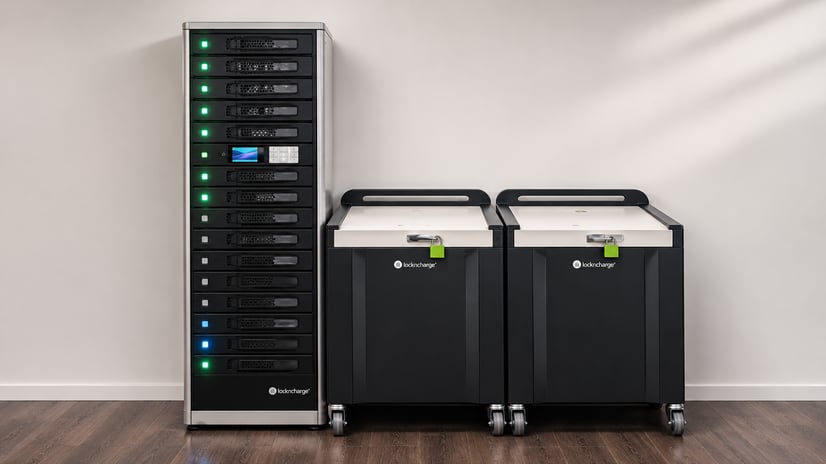
That need has led AFPPCD to build out a LocknCharge setup that now includes eight Carrier™ carts and one 15-bay FUYL™ Smart Locker.
The challenge: Supporting a more digital training program
The move toward digital training was driven by changes to the curriculum.
Dental assistants need practical experience using the same types of software they encounter in dental practices. At AFPPCD, trainees use Chromebooks to work with fictional patient records, scheduling and calendar management, billing and coding, treatment forms and other administrative processes.
Before the curriculum reform, some exercises were completed on paper.
Once AFPPCD introduced Chromebooks, trainers also began finding additional uses for them in other parts of the curriculum, including résumé and cover-letter work.
But a larger device fleet created a new set of practical questions:
- Where would the devices be stored?
- How could AFPPCD keep them charged?
- How could trainers and trainees access devices independently when needed?
Security was also a priority. Equipment had previously disappeared from open office environments, so Josep wanted a system that would reduce the risk of devices being misplaced or taken.
“I absolutely wanted to know where the tablet is at all times.”
The solution: Carrier carts for trainees, a FUYL Smart Locker for evaluators
AFPPCD first introduced eight LocknCharge Carrier Carts to manage its Chromebooks across its four training locations.
To accommodate their larger Chromebooks, AFPPCD uses the carts’ metal rails for storage. This setup gives trainees direct access to the devices: they can walk up to the cart, take a Chromebook, and bring it to their table without needing an individual handoff from staff.
The carts’ top-opening design also makes it easy to see and access the devices at a glance.
“As soon as you open it, you see all the devices, so it’s very easy to grab them.”
AFPPCD later added a FUYL Smart Locker in Paris for a different workflow: managing tablets used during assessments.
Rather than completing an evaluation grid on paper, evaluators can enter results directly on a tablet. The information can then flow into AFPPCD’s master system without a school administrator having to manually transcribe each evaluation afterward.
The distinction between the two device fleets is deliberate:
- Chromebooks are primarily used by trainees and remain in the Carrier carts.
- Tablets are used by trainers and evaluators, so they stay secured in the FUYL Smart Locker until they are needed.
The locker also gives AFPPCD the traceability Josep was looking for. Individual users can have their own access codes, while the FUYL Portal records who opened a bay and whether a device was returned.
That visibility makes it easier to know who has accessed a device and whether it has made its way back to the locker.
Another advantage is the ability to manage locker access remotely.
If someone has difficulty accessing a bay, Josep can use the admin portal from his smartphone to open it remotely without being physically present.
He saw the value of that firsthand while traveling in Japan.
“Someone had forgotten their code, so I opened the bay from Japan in two seconds.”
That remote capability supports a broader goal for AFPPCD: making devices available without tying access to Josep’s location or normal office hours.
It is particularly important for the tablet assessment workflow, where staff need reliable access to equipment even when the person who normally manages it is away.
The results: Less paperwork and a more organised workflow
The clearest impact has been in AFPPCD’s assessment process.
A paper evaluation grid contains around 20 items that must be marked for each trainee. When evaluators use paper, a school administrator later has to transfer those results manually into AFPPCD’s central software.
With tablets, evaluators can record the information digitally at the point of assessment.
“It’s an enormous time saver.”
AFPPCD was reminded of that difference in July, when evaluations took place in Lille while Josep was traveling. Because the tablets had not been brought to the center, staff had to return to the paper process.
“They had to do everything by hand and everyone was complaining. ‘It takes so long. There are no tablets.’”
That experience has helped drive plans to replicate the Paris setup in Lille rather than continuing to transport tablets between locations.
The physical organisation has also been valuable. Josep specifically wanted to avoid tablets, chargers and cables being left across desks and offices.
“I have a problem with cables. I hate cables lying around.”
With devices stored in a dedicated location, staff know where the tablets belong and where to return them. Josep also says the school administrator responsible for the daily assessment process appreciates finding the tablets organised, charged and ready to distribute in the morning.
The system has provided an unexpected benefit as well. AFPPCD currently has spare bays in its Paris locker, and some trainers now use them to securely store their laptops overnight rather than carrying them home and back each day.
Why LocknCharge
AFPPCD originally discovered LocknCharge through its preferred reseller. Josep was drawn to the carts’ design, competitive price and practical top-opening access.
After several years of reliable use, choosing LocknCharge again when AFPPCD needed a smart locker felt like a natural next step. Josep also appreciated details such as the viewing window and status light on each FUYL Smart Locker bay, which make device availability easy to see at a glance.
He found the FUYL Portal straightforward to set up and use, describing it as “quite easy and intuitive.”
Looking ahead: Repeating what works
Following the success of the Paris setup, AFPPCD plans to introduce a smaller FUYL Smart Locker with five tablets in Lille, removing the need to transport tablets between locations for assessment sessions.
The organisation is also considering another Carrier cart in Marseille alongside a potential order of around 10 additional Chromebooks.
For AFPPCD, the goal remains simple: keep devices secure, organised and ready while giving staff and trainees easier access to the technology they need.
Author